
Deuterium Geo Firewall
Network SecurityDescription
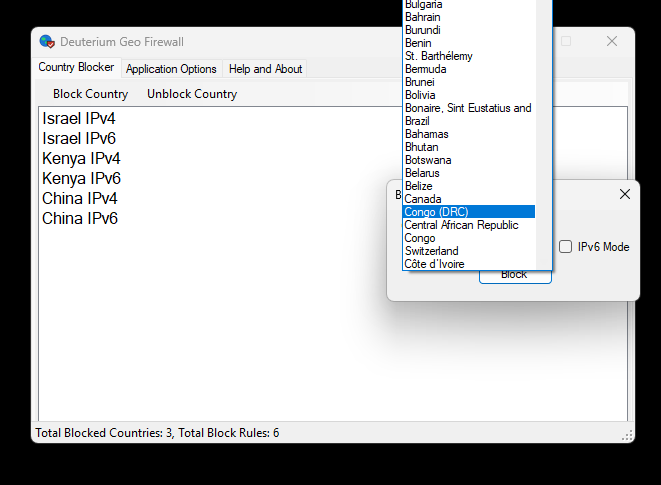
Deuterium Geo Firewall is a simple and easy to use, yet powerful program for Windows that can block connection to your computer, IIS, server etc. according to the geolocation of the incoming IP address. You can block countries that you want to keep from connecting to your computer. Deuterium Geo Firewall creates inbound block rules to Windows Firewall to block IP addresses. It supports both IPv4 and IPv6. You need to download a database to use Deuterium Geo Firewall. You can directly download IPdeny.com IPv4 and IPv6 databases from the program. You need to extract the file and put the .zone files to Database folder. There is also IPv6 subfolder on the default Database folder, which you can put IPv6 .zone files. Please update databases for best results. The application works together with Windows Firewall to block IP addresses. This application requires .NET Framework 4.7.2 and Windows 7 or a later operating system.
Features
- Block countries from connecting to your computer or server.
- Does not run at background, loads rules to Windows Firewall.
- Ability to download IPdeny.com database directly from the app.
- Simple usage.
- Ability to configure database directory path and download URLs.
- Automatic update check option.
File Verification & Safety
To make sure that the tool is downloaded properly, you can check the file SHA-256 hash.
Disclaimer: This free software is provided "as-is" without warranty of any kind, express or implied. The developer assumes no liability for data misplacement or system damage resulting from improper deployment or system anomalies this tool can cause.
Note About Help File
By default, Windows restricts downloaded files from the internet. Due to this, the help file might not work properly. To fix this problem, open the properties page of the help file and click Unblock. See FAQ page for more information.
Software Details
| Programmer: | Emir Alp Koçak |
| License: | Freeware |
| Version: | v1.0.0 |
| Platform: | Microsoft Windows |
| Language Support: | English |
| Release Date: | 13/09/2026 |
| Architecture: | Any CPU |
| Installation: | Setup |